Virtual Sampler - FAQ
|

|
Hello and welcome. This is a first attempt to answer all those frequently asked questions about the Speedsoft Virtual Sampler.
I hope I will be able to also shed some light on the new functions of the virtual Sampler.
This document is much too small, I know, but it is a start and will grow. Thanks to all those who contribute to the VSampler Forum in sharing their knowledge and most importantly their questions. Without your postings this FAQ wouldn't be there. So please keep the questions rolling in. We'll be busy patching it into the carpet. Andreas Sumerauer aka Dausenkunz for the VSampler team
| I want to create a drumset. Do I really have to set the rootkey for each drumsample to the note it is assigned to?
|
No, this is not required. There is an easy way around it. Go to the Ctrl view and set the Split Scale Tune parameter to zero for all splits. Now your drumsamples will not be transposed anymore and will always be played with the original pitch instead. | 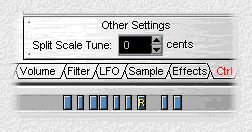 |
I want to use the Virtual Sampler as a VST instrument in Logic Audio 4.7.
If You are using Logic Gold or Platinum 4.7 then please read this Tutorial.
|
| Hi there, I find VS very interesting, what I am still missing is a Key-Zone-Crossfade.
AKAI - Samplers have this feature, which allows two samples to overlap a number of keys.
Can this somehow be done in VS? |
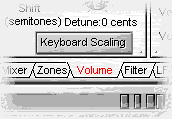
The "Keyboard Scaling" on the volume page should do the job. It has been improved for version 2.6 release and allows you now to modify volume from -100% to +100%.
|  |
It seems like something has gone wrong with the installation of VSampler as a DX instrument.
What can I do?
- Please try to go to the VSampler\bin directory and check for the existance of
the following files:
VSamplerDXi.dll
VSamplerVST.dll
- Check The HKEY_LOCAL_MACHINE\Software\SpeedSoft\VSampler registry entry. The Home entry should point to the VSampler\bin directory. The VSTDir entry should point to your Cubase\VSTPlugIns directory
- From the VSampler\bin directory try to manually register the DXi as follows:
regsvr32 VSamplerDXi.dll
BTW regsvr32 resides in your Windows\System directory.
It will create several registry entries for the VSamplerDXi adapter and gives you a message box that informs about the success of the operation.
|
How can I switch between presets without having to go back and forth to the presets page? I would also sometimes like to know which preset I am currenly editing without switching to the presets page.
Look at the status line at the bottom of the VSampler window. It shows informations about the currently edited preset, split and sample. 
|
| You can use the VSampler browser section to switch among presets: select the banks view. Now open one of the banks to find a list of the presets from which You can choose. | 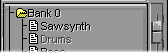 |
Can I use Recycle loops with Vsampler as I am used to with my Hardware sampler?
Yes, VSampler loads Soundfonts that have been exported with Recycle.
BTW: The SBLive Platinum comes with Recycle Lite which is just perfect for the job.
|
Is there a way to combine two presets into one ? I have several loops, split through Recycle and saved as sound fonts. I would like to place them all in one big preset.
Surely,
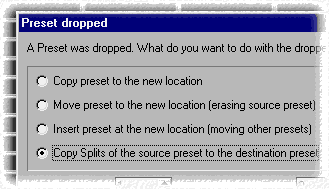
go to the presets view, then rightclick-drag one of the programs onto the other one that You want to merge.
A dialog pops up. Select the last option in the list. which says "Copy Splits ..."
and that's it.
You could as well drag and drop a preset from the VSampler browser section into the grid.
Note: It might be a good Idea to keep a copy of the merging presets. This way You can repeat the operation in case You do not like the results. I always store my composite presets in a bank together with the building blocks just in case I want to change one of them afterwards. |
|
Can I use the Computer Keyboard to trigger midi notes in VSampler?
|
It can be done. Here is what You need:
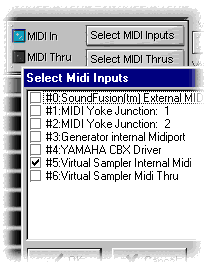
- install the virtual VSampler Midi port. (simply repeat the VSampler installation with the midiport option selected if You haven't done it yet)
- a separate application will change Your computer keyboard into a Midi Keyboard.
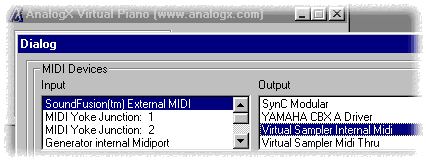
A good one is the Virtual Piano from AnalogX. And it is free.
Setup:
- select the Virtual Sampler Internal Midi port as input device
- Then choose the same midiport as output for the Virtual Piano
|
 |
|
Where have all those bright and extremly witty gems of wisdom been found? (I am talking about the answers in this FAQ of course, ahem)
Most of the questions and answers come from the archive of the Virtual Sampler Support Forum. This is always a good place to go if you are stuck with a problem concerning the Virtual Sampler.
|
(c) Andreas Sumerauer 2001 Last Updated on ... May 18, 2001 |
